From Tool to Teammate: How I Built an AI Agent That Runs My Mornings at an Architecture Practice
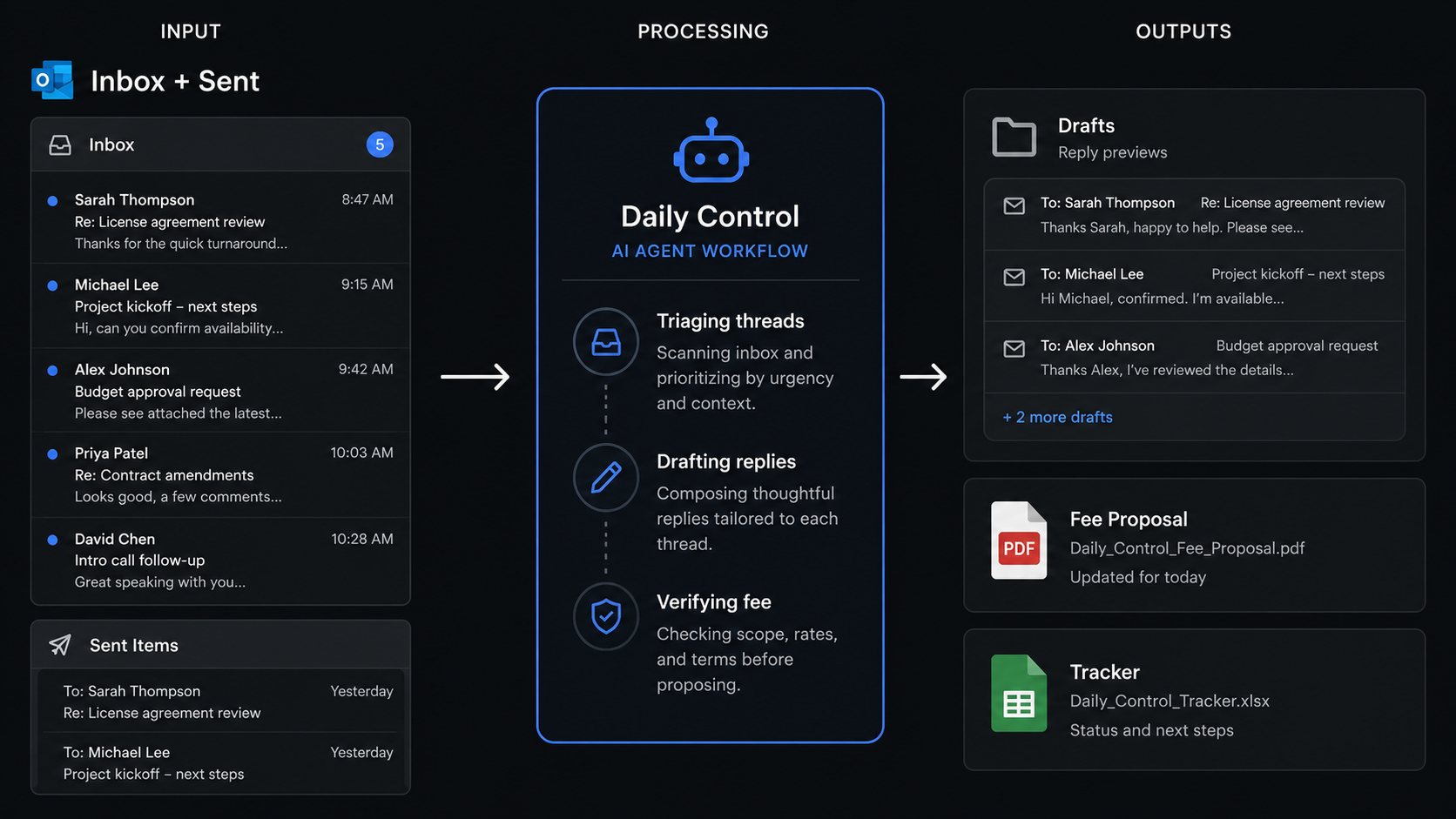
A follow-on account of layering an autonomous, drafts-only AI agent on top of the bespoke fee-proposal tool I built for BrookerFlynn Architects - what it triages, how it runs my own fee engine without Word, and why it always stops short of pressing send.
This piece follows on from an earlier one about building a custom fee proposal tool for the practice. That one was about the tool. This one is about what happened when I stopped driving the tool by hand and built something to drive it for me.
The fee-proposal tool solved a real problem. New project comes in, you fill in a structured form, it writes to the register, calculates the fee across our tiered matrix, renders a branded proposal and drops it into Outlook ready to send. An afternoon of admin became a few minutes. I was pleased with it.
But it left a gap of its own, and the gap was me. The tool only did anything when I opened it and told it to. Every morning there was still the same ritual before any of it could happen: read the inbox, work out what had actually moved overnight, figure out who needed chasing, decide which threads warranted a fee, and remember what I had already dealt with so I didn't do it twice. The proposal engine was fast. Getting to the point of using it still ran on my attention and my memory. So I built the next layer. I call it Daily Control.
What Daily Control actually is
Daily Control is an AI agent - not a chatbot, an agent: something that takes a standing instruction, reaches into my real working tools, makes decisions, and produces work. Each morning it runs my whole opening routine. It reads my Outlook mailbox, decides what needs doing and who owns it, drafts the replies in my own voice, cross-checks everything against the live project and fee registers, prepares any fee proposals that are due, and writes the lot back into a running tracker so nothing slips between days.
There is one rule it never breaks: it does not send anything. Every reply, every proposal, every chase lands in my Drafts folder for me to read and send. The agent does the legwork; the judgement call to put something in front of a client stays with a human. That constraint is deliberate, and I will come back to why it matters more than it sounds.
What it does before I've finished my coffee
The routine is the same every morning, and it is the part that used to cost me the most time and the most mental load.
It triages the inbox and the sent folder. That second half is the clever bit. Plenty of things I get asked about, I have already answered - late the night before, or from my phone on the way in. So the agent cross-references what has come in against what I have already sent, and quietly marks those threads as handled rather than dragging them back onto my list. It only surfaces what is genuinely still open.
From what remains, it works out the actions and groups them by who owns them - me, or each member of the team - and ties each one to its job and project. It reads the latest team meeting minutes so its picture of the live projects stays current. Where a reply is simple and safe - an acknowledgement, a holding line, a scheduling note, something already settled in the tracker - it writes the draft, in plain text, in my voice, on the existing thread, signed off the way I sign off. Where a reply needs a real decision - a fee, a technical position, a commercial judgement - it does not guess. It flags it, tells me what is needed, and leaves it for me.
Then it updates a living tracker file: ticks off what is done, moves sent items into an awaiting-reply list, refreshes the project snapshot, and records any durable facts it has learned so it never has to ask me twice. That file is the agent's memory. It is the reason the system has continuity instead of starting from a blank page every day.
The hard part: running my own fee engine without Word
Here is the problem I most enjoyed solving. The fee-proposal tool generates its PDFs using Microsoft Word under the hood - python-docx fills our real template, and Word itself does the conversion. That works beautifully on a Windows machine with Word installed. An agent that is meant to run anywhere, including off a server with no Word and no PC involved, can't rely on that.
So I taught the agent to sidestep its own engine without losing a drop of fidelity. When a batch of proposals is due, it reaches into the cloud and pulls down my actual generator code and my actual branded template. It runs my real fee calculator - the same tiered, cumulative logic, not a quick approximation - on a Linux box. It renders the finished document to PDF using LibreOffice in headless mode, so the letterhead, the fonts and the layout come out pixel-for-pixel identical to the Word output. Then it writes the proposal row back into the fee register in the cloud and attaches the finished PDF to a ready-to-review Outlook draft.
And it does one more thing that I insisted on: it proves the number before it trusts it. After rendering each PDF, it reads the headline fee back out of the finished document and checks it against what the calculator said it should be. Only if they match does the proposal get attached. This matters because language models are perfectly capable of being confidently wrong about arithmetic, and a fee proposal is the last place you want that. The verification step means the figure on the page is the figure the engine computed - checked, not assumed.
On the morning I first ran it in anger, it produced six fee proposals end to end - two standard tiered fees, a kiosk flat fee, a survey uplift and two ad-hoc Schedule 9 quotes - every figure independently verified, every PDF attached to its draft, in the time it takes to make a coffee. Nothing was sent. All six sat waiting for me to read.
The stack, in plain terms
People keep asking me what this is, technically, so here it is without the mystique. There are three layers, and I built all three.
At the base is the Python and Flask fee engine - the application from the first piece, with its tiered fee calculator, its branded template and its registers. That is the part that knows how BrookerFlynn prices and produces work.
In the middle is a toolset exposed over MCP - the Model Context Protocol - which is how the agent reaches into the real world. Through it the agent reads and writes my Outlook mail and my Excel registers directly via the Microsoft Graph API, live in the cloud, with no files needing to be synced down to a local machine. MCP is, in effect, the set of hands the agent uses to operate my actual tools rather than a sandboxed copy of them.
On top is the agent itself - the reasoning layer that holds the standing instruction, reads its own memory files, decides what to do, and orchestrates everything below it. When the heavy lifting gets large - pulling down code, rendering documents, pushing file bytes around - it hands that work to a separate worker with its own budget, so the main thread stays clear and focused. The renderer that turns the Word template into a faithful PDF without Word is LibreOffice, running headless.
Agent on top, MCP in the middle, Flask underneath, with LibreOffice doing the rendering and a pair of plain-text memory files giving the whole thing a past and a present. That is the entire trick.
Why it stops short of sending
It would have been less work to let it send. I chose not to, and I would make the same choice again.
A drafts-only agent changes what the human is for. I am no longer the person assembling the email, finding the template, copying the fee across and formatting the stage splits. I am the person who reads the finished thing and decides whether it goes. That is a far better use of an experienced pair of eyes, and it keeps a deliberate checkpoint between an automated system and anything a client ever sees. The agent is fast and tireless and occasionally wrong; I am slower but accountable. Putting the checkpoint there, on purpose, is what makes me comfortable letting it do everything up to that line.
What it's actually changed
The time saving is obvious and real, the same way it was with the original tool. An hour of inbox triage and a scattered set of half-remembered follow-ups becomes a clean, ranked list and a folder of drafts before the working day has properly started.
But, as with the first tool, the deeper change is the one I didn't expect. You cannot hand a morning routine to an agent without first describing that routine precisely - what counts as handled, what is safe to answer and what must be escalated, who owns which kind of action, when a fee is implied, where the human has to stay in the loop. All of that lived in my habits, not on paper. Building Daily Control forced me to make it explicit. The result is that my own process is now written down clearly enough that a machine can follow it - which means it is also written down clearly enough that a person could. That is genuine practice knowledge, captured as a by-product of automating it.
The honest limits
It is not magic, and I would rather say so. It does not do design - it will never mark up a service position on a drawing or make a structural call; that is mine. It does not send, by choice. It still depends on people for the things only people can give it: a job number from accounts, a decision on a contested fee, a technical position I have to take myself. And the verification step exists precisely because the underlying model can make mistakes, so I have built the system to check itself rather than to be trusted blindly. The point is not that the agent is infallible. The point is that it does the boring, repetitive eighty per cent reliably, and hands me the twenty per cent that actually needs me.
Where this leaves a small practice
The first piece ended on a claim I have now tested: that building something bespoke is no longer out of reach for a small practice with domain knowledge and a clear brief. Daily Control is the proof of the next step beyond that. It is one thing to build a tool you operate. It is another to build a system that operates your tools for you - and to do it as someone whose training is in architecture, not software.
I don't think this replaces good practice-management thinking. If anything it asks more of it, because you cannot automate a judgement you have never articulated. But the barrier has moved again. A year ago I was describing a workflow to an AI and reviewing the code it wrote. Now I am describing a standing instruction to an agent and reviewing the drafts it produces. The work, in both cases, is the same work it has always been: understanding clearly how a practice actually runs, and being willing to write it down. That, as it turns out, is still most of the job.